Wednesday, February 23, 2011

New things from Apple? MacBook Pro, iPad updates?

Whenever there are pending hardware releases by Apple, rumors abound. Many times, they fade as wisps of flotsam (excuse me, I have been reading English literature again) into nothingness, only to be replaced by more "updated" rumors. No one can predict for sure, but judging by the average production cycles of the various products, many of these guesses prove to be right.

So here's what we know: Apple has announced a special media event to be held in San Francisco, 10 a.m. Pacific Time on March 2 to be held at the Yerba Buena Center for the Arts, a venue Apple has used for a number of prior launches, including the original iPad.

There have been rumors that Apple will update the MacBook Pros tomorrow, Thursday, but some speculate that all of the updated hardware will be announce on March 2. Some say that the MacBook Pros will contain some major changes, like the addition of "Light Peak" under the name "Thunderbolt", a new high speed connection.

So keep a lookout, and those of you getting ready for an update, get your checkbooks ready.

Tuesday, February 15, 2011

Dropbox or SugarSync?

I just signed up for the new file sharing service called SugarSync.

CLICK HERE TO FIND OUT MORE

After reading the features page, I got that excited quivery feeling when you are closer in line and going to be NEXT on the pony ride. If it does what it says it does, it might just knock my trusty Dropbox into the lesser loved sibling. Although Dropbox has become such a trusty companion and important part of my workflow, I can't imagine loving anything more. But you get 5G space on the free service (look carefully on the home page, of course it's the smallest print). One of the things that the creators promise is the ability to sync/upload via email, share files of any size, and get this: stream music to your iPhone (drool).I guess I'm in and I might be in love.

Here's what the creators promise:


Reasons You'll Love SugarSync


Secure, Automatic Data Protection

As you work, your files are continuously backed up to your secure,
 personal SugarSync website using SSL encryption.
Once in our servers, all data is then encrypted with 128-bit AES. 

Anywhere, Anytime Access

If you've got an Internet connection or a smart phone,
you've got a mobile office. So take your BlackBerry to Bangkok,
open your laptop in London – or just stop by an
Internet café in Culver City.
Wherever you go, your files will be waiting for you.
Sync Without Limits
With SugarSync, you can sync as many computers and mobile
devices as you want on a single account — and changes
saved on one computer are instantaneously synced among the rest.

Seamless Collaboration

Easily send files of any size to anyone, from anywhere.
We'll save your file versions and make sure the right data goes to
the right team member, and they can send back an updated document
in just a few clicks. 

File Versioning

Have you ever saved over a document and immediately
wished you hadn't? With SugarSync, we'll save, sync
and back up the five latest versions of any
given file — automatically. In a tough spot,
it can be a real lifesaver. 

Enjoy Your Photos and Music On the Go

We know there's more to life (and backup) than work.
That's why SugarSync automatically organizes
 your photos into online albums for viewing and sharing,
 and allows you to stream your music limitlessly
to any browser or iPhone. 

Cross-Platform Functionality

You can use SugarSync on any modern version of Mac
(including Snow Leopard) as well as any
Windows operating system. 

Customer Phone Support - Business Account

Our professional customer support agents can answer any
questions you have about our Business service, from setup to
 setting storage limits. The call is free and it's open
to all Business Account administrators. 

Administrative Control - Business Account

Our powerful administrative tools make it easy to
customize your account, enable or disable users,
and set storage limits for all your employees.
And with pooled storage and centralized billing,
keeping your whole company in sync is simpler than ever. 


Sunday, February 13, 2011

Everything I learned, I learned from my mother.

My mother is 82, blond and Hungarian. She wears designer jeans, Dolce Gabbana sunglasses, has a perpetual tan and walks 3 miles every day. Here 's a conversation I witnessed when I went with her and her friends (also Hungarian) Adele, Ruza for a late lunch in Kansas City after our pedicure at Walmart. I'll wait for you to take that all in... The conversation was between my mother and the waitress.

Mom (with Hungarian accent): Sweetheart, bring me eggwhite omelet.

Waitress (with Kansas City drawl): Ma'am, we have lot's of delicious things on the menu, but unfortunately we don't serve breakfast after 11:30.

Mom: I know... bring me eggwhite omelet.

Waitress:  (Smile) Golly, Ma'am, I can actually suggest some wonderful soups or sandwiches, but unfortuantely, we don't serve omelets at this time of day.

Mom: I know... bring me eggwhite omelet. And some potatoes WELL DONE. CRISPY!

Waitress: OK. No problem. (walks away)

Mom turns to me and says: If I teach you one thing, it's this. Don't take no for an answer.


So in a true display of genetics, I got the MicroCell for free, as I described in the previous post. This is all to say that I set it up, it was "live" in about 25 minutes, and I now have 4-5 bars on my iPhone in the house. Next!


But I want one.

In my neighborhood, the AT&T cell service sucks. But, alas,  I was not one of those lucky AT&T customers who received a letter offering a free 3G microcell to help with a poor signal at home. And I use my cellphone as my business phone, and CONSTANTLY drop calls on an average of 2-3 times per call. Since I do a lot of remote and phone support, this is  a very bad thing. So I called AT&T and spoke to a very nice agent, who listened patiently to my troubles. I  explained that I felt that this bad phone behavior was costing me business. She put me on hold to check with her service supervisors, and said that AT&T was planning to put a new tower in my area.

 Great! I said, when? October of 2012, she answered. So, I asked her, in 18 months I can expect to have great service at home?

Yes, she replied. When I asked her to please try to get clearance for me to get a 3G microcell for FREE, she confirmed that she could not do that, but that I was free to go into one of the stores and buy one for $199.


The part about going into an AT&T store to get one sounded great. But I was not interested in paying ANY money for it. So today, I walked into one of the AT&T stores in my neighborhood and talked to a guy named Brownie who was from Coffeyville, Kansas,. When he found out that I was from Kansas City, we started commiserating on the poor selection of BBQ in the East Bay. When we finally decided that the only way to get the slabs of ribs we were craving was to go back to the prairie, it was down to business.

I prepared to give him a very involved account of how I only get  "less than one bar at home, dropped calls, etc." I did not get more than two sentences in, when he went to the back, came out with a microcell, and said, "This will help you". No arguments, no pleading, no whining. He helped me register the 2 wireless numbers we have at home, printed out my receipt, explained the terms of the device contract (does not affect your phone contract), put it in a pretty bag, and sent me on my way.

Wait, what? I actually got a solution from AT&T? Well, I got one from Brownie at the AT&T store. Tomorrow I'll hook it up and report on any improvement. And I might just bring Brownie one of my bottles of Gate's BBQ Classic Sauce. I order that by the case.

Tuesday, February 8, 2011

Back to School?

As you know, the digital age is growing faster than an eighth grader. So how do you keep up with the changes? Well, you can read online blogs like this, subscribe to magazines like Macworld or MacTech, or hire someone to teach you. But what if you learn best through hands-on training, but can't afford a personal tutor?

There are several solutions. One of the ones I like the best is Lynda.com. Click on the picture to check it out.

lynda.com

There are literally hundreds of software titles, and more added constantly. Titles like, Photoshop, Dreamweaver, Switching to Mac from Windows, etc. The cost is pretty reasonable, depending on what level of account you buy. You can watch the videos for $25 a month, and for under around $375 a year, you can have full access to the exercise files that accompany each tutorial, so you can practice even when not watching the tutorial.

You can also try it for a day:

Free 24 hour pass to lynda.com.

Another video site I have used is VTC, Virtual Training Center, which in some ways goes into more depth on subjects like Aperture, Photoshop, and FileMaker Pro. This costs about $30 a month.

And believe it or not, YouTube is a great resource for How To videos. Although they are usually done by 13 year old kids, you can learn almost anything from how to change the SIM card in your iPhone, to how to set up a printer wirelessly.

Wednesday, February 2, 2011

Buy it now.

Are you planning to buy a new Mac, iPhone, iPad and want to make sure that a new model does not come out days after you plunk down enough for a mortgage payment? As you may know, Apple is mum about new products. Even Apple store employees claim they don't know anything until the new products actually show up on their shelves. 

But there are ways you can follow Apple's trends, and make a best guess about the production cycles. 

If you go to MacRumors website, and click on the Buyer's Guide Tab, you can read about the cycles of all of Apple's hardware.


For instance, if you are planning to buy a new Macbook, here's what MacRumors suggests:


Another great website that keeps up with the modern trends of All things Apple, is TUAW (which stands for The Unofficial Apple Weblog).

These are two sites that I read along with my morning cup of coffee.

Saturday, January 29, 2011

Wow me.

I won't give a rundown on ALL of the cool things I saw at the Macworld Expo last Thursday, just a few that I am still excited about.

The first thing that caught my attention was Dolly Drive, the first online storage solution that allows you to use Time Machine.


This means that you can do a full Time Machine backup to cloud based storage. This is great news for travelers, who count on being able to access their files on the road. The other great thing about Dolly Drive is the ability to do a bootable backup with the same application. So you can have your Time Machine backed up online, and a bootable backup on an external drive in your office. This negates the need for two separate applications to provide a complete backup solution. For example, in my case, I use ShirtPocket's SuperDuper to make a bootable clone on one external drive, do a Time Machine backup on another, and use JungleDisk for online back up. You can find out more details for each of the products I just listed by clicking the links.

The second bit o' bling that I already have on my machine is Boom for Mac, which was one of the winners of Best in Show, by  a company I have never before this week heard of called Global Delight. I know it sounds like a mail order bride service but no. It is not. It is actually a very simple volume enhancer for your mac. It is inexpensive, and yes, it really does work.


I deeply coveted the LiveScribe smartpen, and if I was a student I would whine for one.


And I am still trying to convince myself that i don't need the Zaggmate case for my iPad, a keyboard and case in one. The $99 price tag on that one is a bit steep for me, and I am thinking that money can be put to better use at Zappos.


Of course, some of my favorite vendors were there, like OWC, where I shop when I need memory and hard drives and the Omni group which makes my favorite task manager and outline program of all time, OmniFocus and OmniOutliner.

Thursday, January 27, 2011

Macmama at the Macworld Expo

I was the one in the Stroud's Kansas City Hat wandering around with my pal and FileMaker guru Dan "Moe" Peck, and Adobe Illustrator goddess Sharon Steuer. Some thoughts about what I saw and what I bought tomorrow. I will say that there were an awful lot of booth babes at this expo. I kept thinking I was back home in KC at the monster truck show. More tomorrow!

Thursday, January 20, 2011

OMG! I can't believe I just did that!

Have you ever thrown away photos that you needed in iPhoto? Today, I received a call from a client who was in a panic because after importing photos from his camera into iPhoto, he accidentally deleted them from the import window. And unfortunately, after the import, he selected the "Delete Photos on Your Camera" so they were erased from his camera's SD card. Of course, he could use one of the SD card data restore software programs like " Card Rescue".


But I figured that even though he had "trashed" the photos, most likely he had not emptied his iPhoto trash. So if this happens to you, don't fret.Open iPhoto, make sure Recent is uncollapsed (is that a word?) by clicking on the gray triangle to the left of the word:


And click on the Trash can.

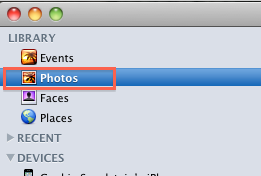
Then, if you have not emptied your iPhoto Trash, your photos will be there. But you must move them out of the trash and back into the library to edit them. So click on one, then press Command-A (not the hyphen, just the Command button and the letter "a") to select all of them, and drag them back into your Library, onto the icon near the top that says Photos.


Then you will be back in business. NOW, it IS a good idea to keep your iPhoto trash emptied, since photos in the trash take up as much room as the ones in your library. To empty the trash, go to iPhoto on the menu bar, and select empty trash (or you can use the keyboard shortcut, Shift-Command-Delete):


Or, if you have iPhoto 11,  with Trash open, just hit the Empty Trash button. When you empty the trash in any of these ways, you will free up the space the discarded photos are taking up.